fbpx
Skip to content
8am - 17pm
+27 21 492 3262
info@smartviewtechnology.co.za
Pasita St, Rosenpark, Cape Town, 7550
smart-view technology logo smart-view technology logo
  • Platform
    • Supported Devices
    • Documentation
    • Contact Support
  • Blogs
    • Smart Water Monitoring
    • Sustainable development goal
    • The Impact Of COVID-19 On Manufacturers
    • Importance of Smart Metering in Industrial Water Management
    • Smart-View Water meter device support
  • Customers
    • Industrial
  • Pricing
  • Success Stories
    • How CRA solved their inefficient, inaccurate billing issues
    • How Virgin-Active saved over 1000kl monthly
    • Virgin-Active Energy Management
    • PepsiCo Utility Management
  • Use Cases
    • Water Sustainability Management
    • Smart-Water Metering Use Cases
  • Our Solutions
    • Smart-Water-Metering
    • Energy Management Solution
  • BOOK A DEMO
smart-view technology logo
  • Platform
    • Supported Devices
    • Documentation
    • Contact Support
  • Blogs
    • Smart Water Monitoring
    • Sustainable development goal
    • The Impact Of COVID-19 On Manufacturers
    • Importance of Smart Metering in Industrial Water Management
    • Smart-View Water meter device support
  • Customers
    • Industrial
  • Pricing
  • Success Stories
    • How CRA solved their inefficient, inaccurate billing issues
    • How Virgin-Active saved over 1000kl monthly
    • Virgin-Active Energy Management
    • PepsiCo Utility Management
  • Use Cases
    • Water Sustainability Management
    • Smart-Water Metering Use Cases
  • Our Solutions
    • Smart-Water-Metering
    • Energy Management Solution
  • BOOK A DEMO

Get Started

8
  • Register
  • Registration
    • Register
  • Profile Management
    • Profile Management
    • Update landing platform
    • Enable Notification
    • Enable Telegram Notification
    • Delete a user
    • Login with a sub-account

Smart-View Utilities

39
  • Metering setup guide
    • Setup guide for smart-meters
      • Add a kamstrup sigfox or mbus smart-water meter
      • Add a GSM Modem
      • Add a Elster A1140 smart meter
      • Add a GWF Hot/Cold Smart-Water Meter
      • Add a honeywell AD120, AD1200 or AD1200-CT Smart Meter
      • Add a Landis + Gyr E550 Smart-Meter
      • Add a HYDRUS 1.3 Diehl Smart-Meter
    • Metering setup data fields
      • Metering Setup Fields
    • Setup guide for IoT Retrofit devices
      • Update Start Reading
      • Add a Visiosoft IoT Metering Device
        • Add a Visiosoft Pulse IoT Water Metering device
        • Add a Visiosoft Pulse IoT Electricity Metering Device
      • Add a Telbit IoT Metering Device
        • Add a Telbit Pulse IoT Water Metering device
      • Add a IZAR RS868 Metering Device
        • Add a IZAR RS 868 Diehl IoT Retrofit Smart-Meter
    • Setup guide for non-smart meters
      • Add a Non-Smart Water Meter
        • Add a non smart-meter
    • Update metering details
      • Edit meter details.
  • Setup metering hierarchy
    • Setup your metering hierarchy if you’re new to Smart-View Utilities.
    • Metering Hierarchy Fields
    • Add a metering section under a metering farm
    • Setup your metering hierarchy if you already use Smart-View Utilities
    • Edit Metering Farm
    • Update Metering Section
    • Update Service Point Fields
  • Billing Management
    • Setup a Sewage Tariff on Smart-View Utilities
    • Billing Section Field Names
    • Link a metering section or service point to a billing section
    • Edit a Billing a section
    • Enable Manual Readings
    • Update or Disable Manual Meter Reading
  • Tariff Management
    • Setup a Water Tariff on Smart-View Utilities
    • Tariff Setup Fields
  • Reporting
    • Recovery Report
    • Billing Section Report
    • Add Residential report
    • Add Industrial Report
    • Access to report
  • Notifications
    • Setup Threshold Limits
    • Setup Threshold Limits on Meter
  • Device Management
    • Smart Meters
      • Configure Modbus address AD120 single phase
  • User Management
    • User Management

FAQ

34
  • Meters
    • Sensus
      • Connect your Sensus 620C/620MC water meter to the Smart-View Utilities Smart Water Management Platform
      • Connect your Sensus 620 water meter to the Smart-View Utilities smart water management platform
      • Connect your Sensus MeiStream meter to the Smart-View Utilities smart water management platform
      • Connect your WP-Dynamic meter to the Smart-View Utilities smart water management platform
    • Precision Meters
      • CONNECT YOUR PRECISION METER DOMESTIC WATER METERS TO THE SMART-VIEW UTILITIES SMART WATER MANAGEMENT PLATFORM
      • CONNECT YOUR PRECISION METER INIFINITY ECO BULK METERS TO THE SMART-VIEW UTILITIES SMART WATER MANAGEMENT PLATFORM
      • CONNECT YOUR PRECISION METER INFINITY EVO CLASS B WOLTMANN METERS TO THE SMART-VIEW UTILITIES SMART WATER MANAGEMENT PLATFORM
    • Itron
      • CONNECT YOUR ITRON WOLTE M WATER METERS TO THE SMART-VIEW UTILITIES SMART WATER MANAGEMENT PLATFORM
    • Elster
      • CONNECT YOUR HONEYWELL (ELSTER) BULK WATER METER H4000 TO THE SMART-VIEW UTILITIES SMART WATER MANAGEMENT PLATFORM
  • General
    • VISIOUTIL TO HRI-MEI CONNECTION DIAGRAM
    • TELBIT – SMARTWATER TO PRECISION METER INFINITY EVO WOLTMANN METER TERMINATED WIRE CONNECTION DIAGRAM
    • VISIOUTIL TO PRECISION METER INFINITY EVO WOLTMANN METER TERMINATED WIRE CONNECTION DIAGRAM
    • VISIOUTIL TO REED SWITCH CONNECTION DIAGRAM
    • VISIOUTIL TO ELSTER PR7 CONNECTION DIAGRAM
    • TELBIT – SMART BULK TO ELSTER’S PR7 CONNECTION DIAGRAM
    • TELBIT – SMART BULK TO PRECISION METER INFINITY ECO BULK METER TERMINATED WIRE CONNECTION DIAGRAM
    • VISIOUTIL TO PRECISION METER INFINITY ECO BULK METER TERMINATED WIRE CONNECTION DIAGRAM
    • VISIOUTIL TO CYBLE SENSOR V2 CONNECTION DIAGRAM
    • TELBIT – SMART BULK TO CYBLE SENSOR V2 CONNECTION DIAGRAM
    • TELBIT – SMART BULK TO PRECISION METER REED SWITCH CONNECTION DIAGRAM
    • VISIOUTIL TO PRECISION METER REED SWITCH CONNECTION DIAGRAM
    • TELBIT – SMARTWATER TO HRI-B CONNECTION DIAGRAM
    • VISIOUTIL TO HRI-B CONNECTION DIAGRAM
    • TELBIT SMARTWATER TO HRI-MEI CONNECTION DIAGRAM
    • TELBIT SMARTWATER TO RD-01 CONNECTION DIAGRAM
    • VISIOUTIL TO RD-01 CONNECTION DIAGRAM
    • Limo -Client-Cloud Services Setup
    • Setup AD120 meter on limo client
    • Setup AD1200 meter on limo client
    • Configure Modbus address AD1200 Direct or CT Type
    • Confirm Communication Parameters for Honeywell AD120 Meter
    • How to Setup the KoCos Limo Client
    • Confirm Communication Parameters for Honeywell AD1200 meter
    • VisioAqua Diagnosing Connectivity issues

Utilities Mangement System

38
  • User Management
    • User Setup Fields
    • User Account Setup
  • Setup Metering Hierarchy
    • Metering Hierarchy Fields
    • Setup your metering hierarchy if you’re new to smart-view utilities management.
    • Setup your metering hierarchy if you already use Smart-View Utilities Management
    • Edit Metering Section
    • Edit Metering Point
  • Metering Setup Guide
    • Metering Setup Data Fields
    • Setup Guide for Smart-Meters
    • Setup Guide for Retrofit IoT Devices
    • Setup Guide for Non-Smart-Meters
    • Update Metering Details
  • Notification Management
    • Notification Setup Fields
    • Setup Notification Type On Metering Section
    • Setup Notification Type On Metering Point
    • Alerts: View Offline Devices
    • Enable Notification Settings
  • Account
    • Update Profile
    • View Account Summary
    • View Invoices
    • Add Invoice Profile
    • How to request Looker Studio Report?
  • UMS Mobile Application
    • Login: Tenant
    • Notifications: Notification Setup
    • Login: Admin
  • Change Logs
    • 2023 Releases
      • Jan 25th – Version 1.6.0
      • Feb 2nd – Version 1.7.0
  • Report Management
    • View Metering Point Statement
  • Billing Management
    • How to view Additional Data From The Spreadsheet
    • How to accept the estimate reading
    • How to enter the actual reading
    • How to close meter reading
    • How to close the billing period
    • How to sync the Billing Report
  • Operational Support Documentation
    • Water Meters Pulse Factors
    • Connect Honeywell AD1200 meter to KoCos Modem
    • Device Troubleshooting
      • Retrofit IoT Device: VisioUtil
      • Retrofit IoT Device: SmartWater

Job Box

1
  • Job-Box our Field Deployment Tool
  • Home
  • Docs
  • Smart-View Utilities
  • Notifications
  • Setup Threshold Limits
View Categories

Setup Threshold Limits

How to setup hourly, daily, weekly & monthly threshold limits on a meter

Time needed: 1 minute

  1. Login

    Login to Smart-View Utilities

  2. Open the Side Menu

    Open the side menu by clicking the Hamburger Menu.

    Platform Navigation Bar

  3. Then open Device Menu Tab

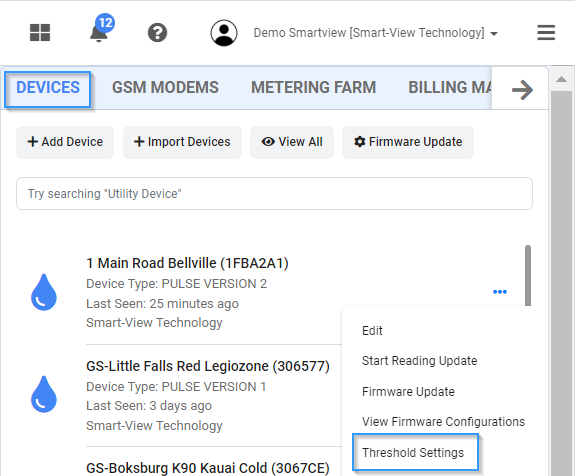
    • Click the “Device” Tab then click “the 3 dots” then Threshold Settings and wait for the input form to load.
    setup-threshold-management

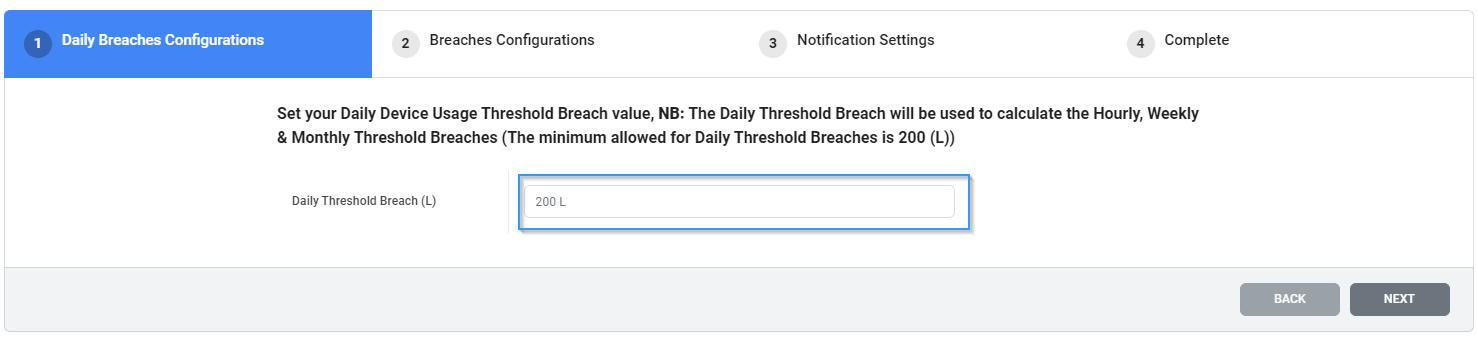
  4. Next add your daily threshold limit


    threshold-settings-daily

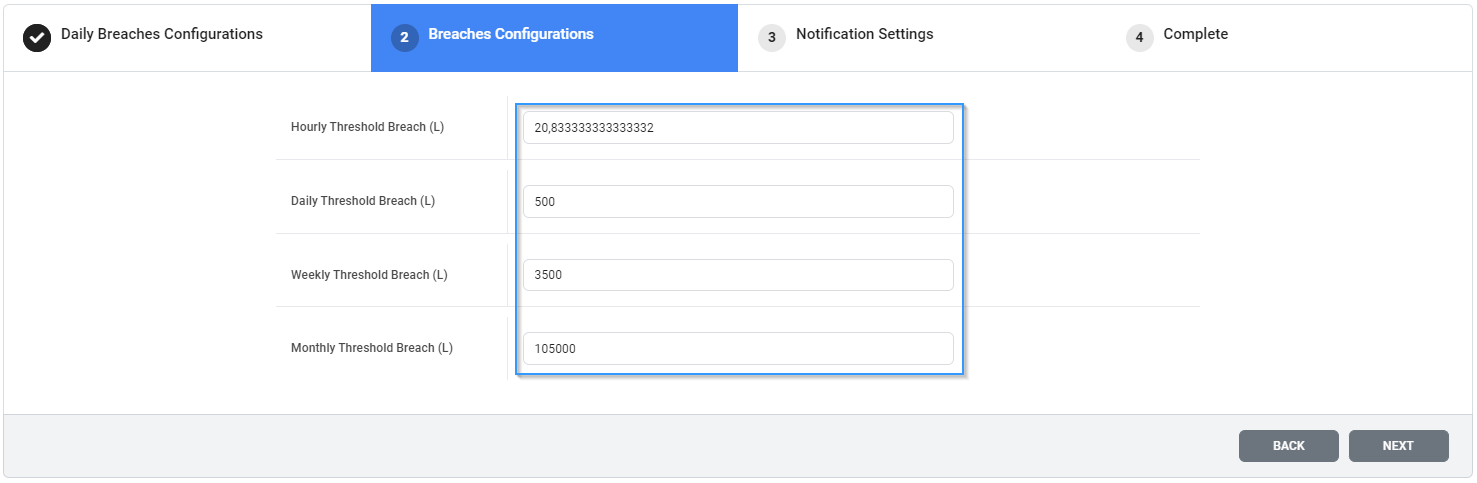
  5. Your hourly, weekly & monthly threshold limits will be calculated automatically however you can update it.

    threshold-settings-daily-hourly-weekly-monthly

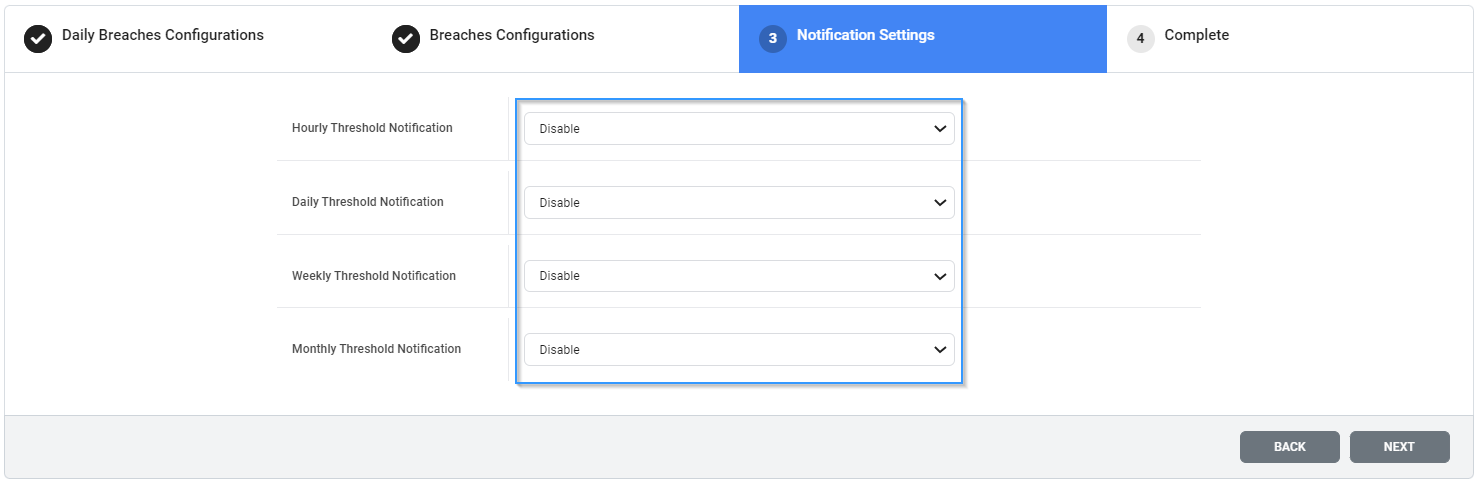
  6. Next enable which notifications you would like to receive. Click next & save the settings.
    notification-settings

How to setup hourly, daily & monthly threshold limits on a metering farm, metering section or service point

Time needed: 1 minute

  1. Login

    Login to Smart-View Utilities

  2. Open the Side Menu

    Open the side menu by clicking the Hamburger Menu.
    Platform Navigation Bar

  3. Open Metering Farm Menu

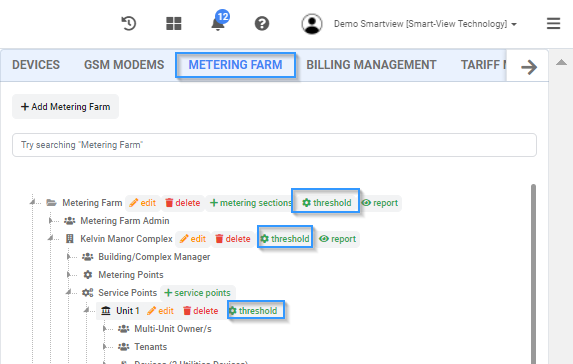
    • Click the “Metering Farm ” Tab then expand the Metering Farm, Metering Section and Service Point then click threshold or hierarchy level that you would like to setup and wait for the input form to load.
    setup-threshold-limits-on-metering-hierarchy

  4. Next add your daily threshold limit


    threshold-settings-daily

  5. Your hourly, weekly & monthly threshold limits will be calculated automatically however you can update it.

    threshold-settings-daily-hourly-weekly-monthly

  6. Next enable which notifications you would like to receive. Click next & save the settings.
    notification-settings

What are your Feelings
Share This Article :
  • Facebook
  • X
  • LinkedIn
  • Pinterest
Still stuck? Contact Support

How can we help?

Updated on April 10, 2022

Powered by BetterDocs

  • footer-shape1
  • footer-shape2
smart-view technology logo
Smart-View Technology provides enterprise-grade utility management solutions. Our advanced software allows for real-time monitoring and management of consumption, making it easier for businesses to control costs and improve efficiency.

Our Solutions

  • Smart-View Residential Utilities
  • Smart-View Industrial Utilities
  • Smart-View IoT Gateway
  • Job-Box

Supported Devices

  • Data Integration

Industries

  • Food-Beverage-Manufacturing
  • Retail

Blog

  • Importance of Smart Metering in Industrial Water Management
  • Smart Water Monitoring
  • Smart-View Water meter device support
  • The Impact Of COVID-19 On Manufacturers

Company

  • Contact us

Support

  • Knowledge Base
© Copyright 2022. Smart-View Technology
Manage Consent
To provide the best experiences, we use technologies like cookies to store and/or access device information. Consenting to these technologies will allow us to process data such as browsing behavior or unique IDs on this site. Not consenting or withdrawing consent, may adversely affect certain features and functions.
Functional Always active
The technical storage or access is strictly necessary for the legitimate purpose of enabling the use of a specific service explicitly requested by the subscriber or user, or for the sole purpose of carrying out the transmission of a communication over an electronic communications network.
Preferences
The technical storage or access is necessary for the legitimate purpose of storing preferences that are not requested by the subscriber or user.
Statistics
The technical storage or access that is used exclusively for statistical purposes. The technical storage or access that is used exclusively for anonymous statistical purposes. Without a subpoena, voluntary compliance on the part of your Internet Service Provider, or additional records from a third party, information stored or retrieved for this purpose alone cannot usually be used to identify you.
Marketing
The technical storage or access is required to create user profiles to send advertising, or to track the user on a website or across several websites for similar marketing purposes.
  • Manage options
  • Manage services
  • Manage {vendor_count} vendors
  • Read more about these purposes
View preferences
  • {title}
  • {title}
  • {title}
BOOK A DEMO
Book A Demo